A new weekly customer
Capture the address, requested service, pool details and access requirements. Check the service area and send the request for route-capacity approval.

Outsourced support teams
Answering services
 Unified CCaaS platform Voice, chat, QA, and workforce management — unified.
Outsourced support teams
Hire Your TeamManaged ServicesPay per ResolutionEcommerce Support OutsourcingAmazon Support OutsourcingMultilingual SupportQuality AssuranceAnswering services
Answering ServiceAI Answering ServiceAfter-Hours & 24/7Bilingual (EN·ES)For Small BusinessFor Law Firms All Services See PricingIndustries / Pool services
An AI receptionist for pool services can answer routine questions and capture new enquiries while your technicians are on route. Callnovo combines AI intake with live-agent support for conversations that need more attention. Your team controls route capacity, approved appointment times, repair decisions and safety-sensitive requests.
Discuss your coverage
01
During a busy service day, a new weekly customer, a one-time cleaning request and a complaint about a missed visit can arrive together. Each needs a different next step. Callnovo can gather the details and direct the request while your field team continues its work.
Use AI for approved routine answers and intake. Bring a live agent into conversations that need clarification, reassurance or an agreed exception. A repair recommendation, chemical instruction or new route commitment stays with the person your business authorizes.
Capture the address, requested service, pool details and access requirements. Check the service area and send the request for route-capacity approval.
Identify the job and offer only approved appointment availability. Keep repair assessments separate from cleaning bookings.
Find the customer's record, collect the reported issue and send it to the named service owner. Confirm the next contact step without inventing a replacement visit.
02
A recurring customer needs room on a service route, not just an empty calendar slot. Collect the address, service type, pool or equipment details relevant to your process, access arrangements and preferred contact time. Let the person managing the route approve the recurring commitment.
For a one-time appointment, the answering team can work with your approved availability once booking access is configured. If the job type, area or schedule needs checking, keep it as a request and assign a callback. Tell the caller what will happen next.
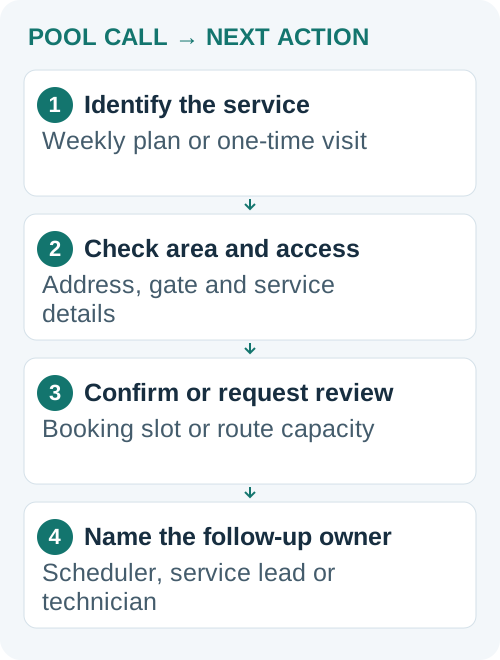
Give the team your weather-delay policy and the rules for locked gates, pets and unavailable access. These details can change the next action even when the address is already on a route.
03
A missed-visit complaint needs a record check and an owner who can decide the remedy. The answering team can collect the customer's account, locate available notes and arrange the agreed follow-up. It should not promise a free service, refund or arrival time without authority.
Keep chemical and electrical concerns on a separate escalation route. CDC guidance emphasizes trained handling of pool chemicals, and CPSC identifies electrical hazards around pools. The answering team should not tell a caller to mix chemicals, open electrical equipment or attempt a repair.
Use approved safety wording and direct immediate danger to the appropriate local emergency service. Name the technical contact and backup for other safety-sensitive reports. Record what the caller said and who received the request; a message marked urgent is useful only if someone is responsible for acting on it.
Safety references: CDC pool-chemical safety guidance · CPSC electrical safety around pools
04
Price the coverage you need before choosing a plan. A low-volume answering need may suit AI or an agreed shared arrangement. A dedicated person makes more sense when the work needs regular follow-up and detailed account knowledge. Standard Callnovo projects use dedicated staffing.
US$0.15
per active AI minute · English
US$200 monthly minimum per voice bot. Carrier and number charges are separate.
US$0.15
per customer session
A session uses a 24-hour window. US$200 monthly minimum for the message bot, separate from the voice bot.
From US$650
per month · 1,500 included minutes
Phone coverage Monday–Friday, 9 a.m.–5 p.m. Eastern Time. Nights, weekends and any extra volume need an agreed scope.
From US$5.80
per hour, per agent
Dedicated staffing from half a seat to 200+ seats. Language, skills, coverage and project requirements affect the final quote.
For larger projects with a defined, verifiable outcome, outcome-based pricing starts at US$1 per agreed resolution, with a US$200 monthly minimum. Unresolved attempts do not incur a result fee; the monthly minimum still applies. Routine message-taking does not automatically qualify. Confirm eligibility and the resolution definition in the proposal.
Read the full pricing and package conditions.
Use your actual call volumes and handling times when planning the budget. An unanswered enquiry is a potential opportunity, not guaranteed revenue or profit.
05
Callnovo supports Jobber, ServiceTitan and Skimmer integration. Agree the records and fields the team can access, the appointments it can confirm and how route-capacity decisions reach the scheduler. The work depends on your system permissions and configured workflow.
Test a new recurring-service enquiry, a one-time booking and a missed-visit complaint. Add a failed-update test so an unavailable integration cannot silently lose a customer's request. Your team should see the history, current status and person responsible.
Standard staffing can be ready in as little as five days. Your training needs, access setup and system connections affect the complete launch schedule. Bring service-area rules, route-approval contacts, booking windows and your weather and access policies to the setup discussion.