

Email Support Outsourcing: What to Hand Over, What It Costs and What Your Contract Must Say
Email support outsourcing guide: which emails to hand over, which replies start legal deadlines, the contract clauses to require and how to compare quotes.

Este artículo está actualmente disponible solo en inglés.Ver en inglés →
Email support outsourcing means an outside team answers your customers’ emails under your brand, usually from inside your own helpdesk. Some providers pair their human agents with an AI agent that drafts or sends the routine replies.
Finding a provider is the easy part. The harder decisions are which emails the team may answer alone, which replies carry legal deadlines, what the contract must say about customer data, and how to compare quotes that bill for different things. This guide works through each one for a US ecommerce or D2C support team.
What email support outsourcing covers, and what stays in-house
An email answering service is the same arrangement under another name: an outsourced team reads incoming support emails and replies as your brand. In most email support outsourcing setups, the team works in your helpdesk with logins you issue and macros you approve, so the ticket history stays with you.
That is a different job from email management, which means sorting and filtering an inbox. It is also different from buying software. If you are choosing the tool itself, our guide to an email ticketing system covers that decision.
Before you outsource email support, sort your emails by type. Use the table as a starting point and adjust it to your own policies.
| Email type | How to handle it | Why |
|---|---|---|
| Order status and tracking inquiries | Hand over | The answer comes from order and carrier data the team can look up, for example in Shopify |
| Return and exchange policy questions | Hand over | The policy is written down, and the reply explains it |
| Address, size or item changes before shipping | Hand over with written limits | A change after fulfillment starts can cost you money |
| Shipping delays you cannot meet | Hand over with written limits | The delay notice is regulated, as the next section explains |
| Refunds, partial refunds and store credit | Hand over with written limits | Set a dollar ceiling and name who watches the deadline |
| Warranty replacements and subscription cancellations | Hand over only after your in-house owner confirms the rules | These replies make commitments on your behalf |
| Fraud, chargebacks and payment disputes | Keep in-house | They need account access and judgment an outside team should not hold |
| Product safety reports and legal threats | Keep in-house | Your product or legal owner needs to see them from the first reply |
The rule of thumb: high-volume emails with a written answer can go out. Emails where one reply can change your legal or financial position stay in.
Order-status mail is often the largest group. Our guide to order status inquiries covers checking the order and each parcel before answering, and counting repeat contacts.
Write down what the outside team may do, because some replies start legal clocks
When an outsourced human agent or an AI agent sends a shipping-delay notice, a refund confirmation or a cancellation confirmation, the customer reads it as your company’s promise. Under the FTC’s Mail, Internet, or Telephone Order Merchandise Rule, these obligations sit with you as the seller, whoever types the email.
Here is what the rule requires (FTC, 2025):
- Ship within the shipping time you state. If you state no time, the rule gives you 30 days after you receive a properly completed order.
- If you cannot ship on time, offer the customer a choice before the deadline passes: agree to the delay, or cancel and get a prompt refund. The FTC’s business guide to the rule confirms this delay option notice can go to the customer’s email address.
- If the new shipping date is 30 days or less past the original deadline, the notice must say that no response from the customer counts as consent to the delay.
- When an order is canceled under the rule, the FTC’s guide says the refund is due within seven working days, or within one billing cycle when you extended the credit yourself.
These deadlines run the same way whether your own staff or an outside team answers the email. So give your authorization table two extra columns: the deadline, and the person inside your company who watches it.
| Action | Can the outside team act alone? | Legal deadline or limit | In-house owner |
|---|---|---|---|
| Send a shipping-delay option notice | Yes, with your approved template and the revised date your warehouse gives | Before the original shipping deadline; the notice offers delay or cancellation | Fulfillment lead |
| Confirm a cancellation and refund for an order you could not ship | Yes, up to your dollar ceiling | Refund within seven working days, or one billing cycle for credit you extended | Finance or support lead |
| Issue a refund or credit for a return | Up to a per-order ceiling you set | Your written return policy | Support lead |
| Approve a warranty replacement | Only after your in-house owner confirms the rules | Have your in-house owner confirm the rules that apply | Product or legal owner |
| Cancel a subscription | Only after your in-house owner confirms the rules | Have your in-house owner confirm the rules that apply | Billing owner |
| Promise a delivery date | No; quote only dates from your order system | Feeds the shipping deadline above | Fulfillment lead |
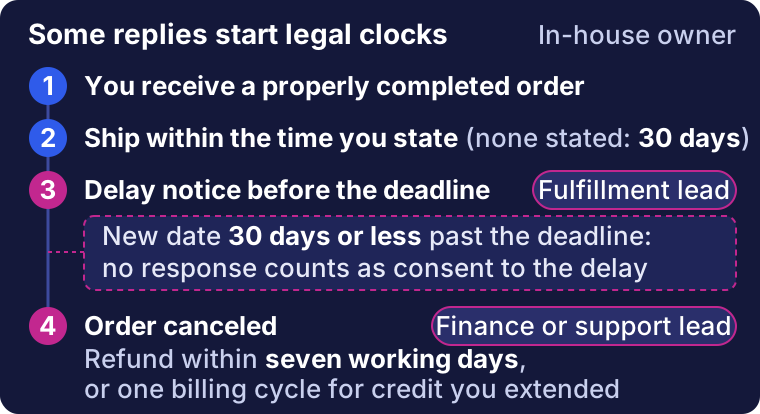
The rule’s clocks from the list above, with the in-house owners from the authorization table.
Missing details slow these replies down. Every email that goes back to the customer to ask for an order number or a serial number spends time on a clock that is already running.
A HeroDash customer story about BOTSLAB, a smart camera brand that supports buyers in Germany, describes one way to cut those round trips. Support emails become tickets automatically, and the after-sales form uses custom fields with format validation, so a human agent cannot submit a serial number in the wrong format.
Ask any provider whether intake works the same way in your helpdesk: required fields for the order number, serial number and photos before the ticket reaches a human agent.
Customer data and the contract clauses the law asks for
Every support email carries personal information: names, addresses, order histories, sometimes photos. Handing the inbox to a provider means disclosing that data, so the contract matters as much as the staffing plan.
If the California Consumer Privacy Act (CCPA) applies to your business, the California Privacy Protection Agency’s regulations list what your contract with a service provider must contain (CPPA, 2026). The list sits in §7051(a), in effect since January 1, 2026. Among other terms, the contract must:
- prohibit the provider from selling or sharing the personal information;
- name the specific business purpose, here answering customer support email, and not describe it in generic terms such as a reference to the whole contract;
- prohibit the provider from retaining, using or disclosing the information for any other purpose;
- require the provider to comply with the CCPA and give the information the same level of privacy protection;
- give you the right to take reasonable steps to check how the data is used, and to stop and fix unauthorized use;
- require the provider to tell you if it can no longer meet its obligations;
- require the provider to help you handle consumer requests, such as deletion requests.
The regulations also say what happens without those terms. A person without a contract that complies with §7051(a) is not a service provider under the CCPA (§7050(e)). Your disclosure to that person may then be treated as a sale or sharing of personal information.
| Rule or question | When it applies | What to put in the contract or process |
|---|---|---|
| CCPA service provider terms | If the CCPA applies to your business | The §7051(a) terms above, signed before the provider gets helpdesk access |
| Subcontractors | If the provider uses another company for staff or tools | A matching contract between the provider and the subcontractor (§7051(b)) |
| GDPR processor contract | If you sell to customers in the EU | Have your privacy owner check the processor contract requirements separately |
| AI drafting tools | If the provider’s tools draft or send replies | Ask in writing whether customer emails are used to train models and where drafts are stored |
Settle these terms before the provider logs in for the first time. Have your counsel confirm which of these laws apply to you.
Running it week to week: AI drafts, people approve, and two clocks
Once the team is live, track two clocks separately: time to first response and time to resolution. A fast acknowledgment can hide an issue that stays open for days.
Email does not need the instant replies customers expect in live chat, but the issue still has to close. If you also hand over chat, our guide to live chat outsourcing covers cost, coverage and provider fit for chat.
| Metric | Definition | Who records it | What to watch for |
|---|---|---|---|
| First response time | From the customer’s email to the first reply, human or AI | Helpdesk report | Fast first replies paired with slow resolution |
| Resolution time | From the first email to the issue being closed and staying closed | Helpdesk report | Categories that sit open past your deadlines |
| Reopens | Resolved tickets the customer reopens | Helpdesk report | Reopens clustered in one category or with one human agent |
| Repeat contacts | Same customer, same issue, new ticket | Helpdesk merge rules or a weekly sample | Issues closed without being fixed |
| Quality score | Your rubric applied to a sample of replies | Your team, not the provider | Accuracy, tone and policy errors |
| CSAT | Customer satisfaction survey after resolution | Survey tool | Low scores on specific reply types |
Pull the quality review sample yourself. If the provider chooses which tickets you see, you are reviewing its best work. Our guide to customer service quality assurance shows how to build the scorecard and check the scorers.
If the provider uses AI, release it in steps:
- Draft only. The AI drafts each reply, and a human agent reviews and sends it.
- Release simple categories. Let the AI send order-status and policy replies on its own once your reviewers stop changing its drafts in that category.
- Keep approval on anything with a legal clock or a money decision: delay notices, refunds above your ceiling, warranty and cancellation requests.
- Recheck after every policy change, because the AI answers from the knowledge you give it.
Some emails should go to a person every time: angry or threatening messages, safety reports, chargebacks, and anything your knowledge base does not cover. When the AI hands over, the human agent should see the whole thread and what the AI already tried, so the customer does not have to explain twice. That handover is part of the customer experience you are paying for.
Approved templates make both the AI drafts and the human replies more consistent. Our customer service email templates for ecommerce include five you can adapt and say when a template should stop and a person should take over. For how an AI agent drafts, gets reviewed and sends email replies, see AI email customer support in HeroDash.
Pricing for outsourcing email support: compare billing units, not headline rates
Before you price outsourcing email support, start with an in-house baseline. Federal wage data puts the median hourly wage for customer service representatives at $21.53 in May 2025 (BLS, 2025). That figure covers representatives in every channel, not only email, and it is wages only: benefits, equipment, helpdesk seats and supervision come on top.
Email customer service outsourcing quotes come in four billing units. Each one pays for something different and pushes the provider toward different behavior.
| Billing unit | What triggers a charge | What it rewards | Ask before signing |
|---|---|---|---|
| Per human agent hour or dedicated monthly fee | Paid hours, whether or not emails arrive | Coverage and availability | Minimum hours, how idle time is billed, who covers absences |
| Per ticket | Each ticket the team handles | Volume of tickets touched | Does a follow-up or reopened ticket count again? Are spam and auto-replies excluded? |
| Per successful AI reply | Each reply the AI sends under your rules | Replies that pass your bot rules | What counts as successful, the monthly minimum, and how replies that lead to a reopen are tracked |
| Per resolution | Each issue closed as resolved | Finished issues | The written definition of resolved, how a reopen is treated, the minimum commitment |
A per-ticket price looks precise, but a ticket that bounces back three times can be billed three times. A per-hour price is predictable, but you pay for quiet hours. In outsourcing, these definitions decide the bill, so get each one in writing.
The per-successful-reply unit needs the closest reading. HeroDash’s pricing page lists its email bot at $0.10 per reply and says only emails the AI successfully replies to under your bot rules are billed. An unsuccessful reply is not billed. Each bot carries a $200 monthly minimum, counted separately for message, email and voice bots.
A successful reply is still not the same thing as a resolved issue. If the customer writes back because the answer did not settle the problem, that is a reopen, and it belongs in your weekly numbers.
To compare quotes, put every one on the same footing:
Cost per resolved issue = (service fees + tools + the management time you still spend) ÷ issues actually resolved
Here is a worked example. The month is invented to show the arithmetic, not a quote:
- 2,000 email issues arrive.
- The AI email agent sends 1,200 successful replies under your rules. 100 of those customers write back because the answer did not settle the issue.
- People handle the other 800 issues plus the 100 that came back, 900 in total. One dedicated English-speaking human agent working 160 hours covers them.
- Your own team spends 20 hours on quality review and approvals.
- All 2,000 issues end the month resolved.
- Your helpdesk subscription is left out because you pay it with or without a provider.
| Line item | Price used | Month total |
|---|---|---|
| AI email agent | $0.10 per successful reply, $200 monthly minimum per bot | 1,200 × $0.10 = $120, so the $200 minimum applies: $200.00 |
| Dedicated human agent (English) | Callnovo.ai starting rate for a dedicated English agent, $5.80 per hour | 160 × $5.80 = $928.00 |
| Your oversight time | BLS median wage, $21.53 per hour, wages only | 20 × $21.53 = $430.60 |
| Total | $1,558.60 | |
| Cost per resolved issue | $1,558.60 ÷ 2,000 = about $0.78 |
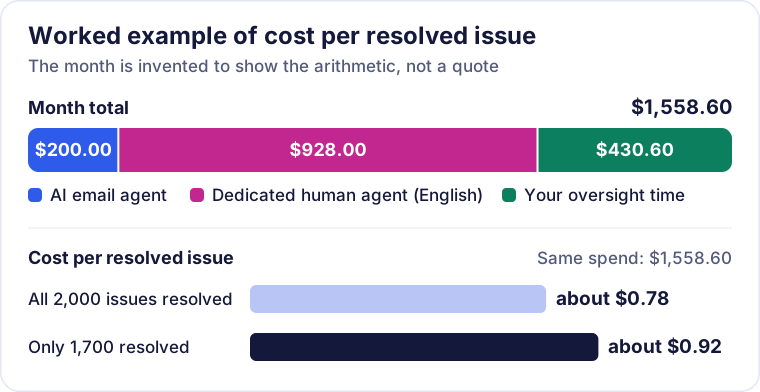
The worked example from the table above. The month is invented to show the arithmetic, not a quote.
Now change one input. If only 1,700 of the issues were actually resolved, the same spend works out to about $0.92 per resolved issue. The denominator moves the result as much as any rate does, which is why reopens and repeat contacts belong in the quote comparison.
The dedicated rate in the example is a starting price from the Callnovo.ai pricing page; language, coverage hours and complexity change it. If you also buy phone coverage, the same billing-unit questions apply, and our guide to answering service pricing works through them for calls.
How to choose an email support outsourcing provider
Give every candidate the same brief: monthly volume, the mix of email types from the first table, your current first-response and resolution times, the helpdesk and mailboxes you use (for example Gmail or Outlook), and your authorization table.
Then test with real email. Pull a set of past emails, remove personal details, and ask each provider to answer them in writing. Include these cases:
- A shipping delay with a revised date about three weeks out. Check that the reply offers the choice to wait or cancel and says what happens if the customer does not respond.
- A partial refund above your ceiling. It should be escalated, not approved.
- A warranty replacement request. The team should stop and check your in-house rule instead of promising a replacement.
- A subscription cancellation. Same test: does the team follow your confirmed rule or improvise one?
- An angry email that threatens a chargeback. It should reach a person on your side.
Read the answers for written communication first: does each reply answer the question asked, in plain language and your brand’s tone? Then check which cases they escalated and why.
| What to evaluate | Evidence to request |
|---|---|
| Written communication | Unedited answers to your test emails |
| Escalation discipline | Which test emails they escalated, and the reason for each |
| Billing definitions | The written definition of a ticket, a successful reply or a resolution, and whether reopens are billed |
| Helpdesk and data ownership | Confirmation that you own the helpdesk account, macros and ticket history |
| Subcontractors | Who they are, where they work, and the contract terms that pass down to them |
| Exit | How access is removed and records are returned when the contract ends |
Callnovo.ai is one provider built around this split. AI handles repeatable intake, FAQs, summaries and first responses, and human agents take over when a case needs judgment, empathy, language fluency or escalation, with the customer context carried across. You can staff a dedicated team by the hour or pay only for resolved issues through pay per resolution. It fits the “hand over” rows of the first table; the rows marked keep in-house stay with your team under any provider.
Before you sign: a contract checklist
Confirm each item is written into the contract or statement of work:
- Scope: the email types the team handles, taken from the first table.
- Authorization limits: a dollar ceiling for refunds and credits, and the actions that need your approval.
- Deadline owners: named people for shipping-delay notices and refunds under the Mail Order Rule.
- CCPA service provider terms if the CCPA applies to you, plus matching subcontractor contracts. GDPR processor terms checked separately if you sell in the EU.
- Billing unit defined in writing, including whether follow-ups and reopens are billed.
- AI tools: how customer emails are used and stored, and whether they train models.
- Quality: you choose the review sample; first response, resolution and reopens are reported separately.
- Exit: access removal, return or deletion of data, and handover of macros and templates.
- Pilot: a trial period with acceptance criteria set from your current numbers.
Start with the first table. Once your email types are sorted and your deadline owners are named, the rest of the checklist and every quote become easier to compare.
References
- Federal Trade Commission — Business Guide to the FTC’s Mail, Internet, or Telephone Order Merchandise Rule (edited January 2025); rule text at 16 CFR 435.1 and 435.2
- California Privacy Protection Agency — CCPA Regulations, §7050 and §7051 (effective January 1, 2026)
- U.S. Bureau of Labor Statistics — Occupational Outlook Handbook: Customer Service Representatives (median pay, May 2025)
- Callnovo.ai — Pricing
- Callnovo.ai — Pay per resolution
- HeroDash — Pricing (linked in the pricing section)
- HeroDash — BOTSLAB customer story
Lo que preguntan los compradores
- Can AI answer customer support emails on its own?
- Yes, for categories with a clear written answer, such as order status and return policy questions, once you have checked its drafts in that category. Keep a person approving replies that start a legal deadline or move money: shipping-delay notices, refunds above your ceiling, warranty replacements and cancellations. Ask how the AI is billed, too. HeroDash, for example, bills its email bot per successful reply and does not bill an unsuccessful one.